Client Generator
The OpenAPI Generator for OpenEdge ABL produces enterprise-ready client libraries with advanced features for API consumption, including comprehensive model builders, HTTP client management, and flexible configuration options.
Prerequisites
- VSCode: Install Visual Studio Code
- Riverside ABL LSP Extension: Install OpenEdge ABL (riversidesoftware.openedge-abl-lsp) for ABL language support
- Optional: API4UI Toolbox: Install API4UI - UI Designer & Toolbox (ai4you.api4ui) for simplified project setup and additional tooling similar to Developer Studio
1. Setup OpenEdge Project in VSCode
- Create a new folder for your OpenEdge project (e.g.,
openapi_client) - Open the folder in VSCode
Initialize Project Configuration
Use the API4UI Toolbox for easy project initialization (recommended):
- Right-click your project folder in VSCode Explorer
- Select API4UI Toolbox > ABL > Initialize > Initialize Project Configuration
- This creates the required
openedge-project.jsonfile for the Riverside extension
Alternatively, follow the VSCode ABL Github page for manual project configuration.
Configure Project
Configure your OpenEdge project according to your environment. The Riverside extension requires proper configuration for ABL language features to work correctly.
Note: Detailed configuration steps are beyond the scope of this guide. Refer to Riverside's documentation or use the API4UI Toolbox for guided setup.
2. Launch OpenAPI Generator Extension
- Open VSCode Command Palette (Ctrl + Shift + P / Cmd + Shift + P)
- Type and select: "Launch OpenAPI generator 😎 (vscode sync)"
Configure Generation Settings
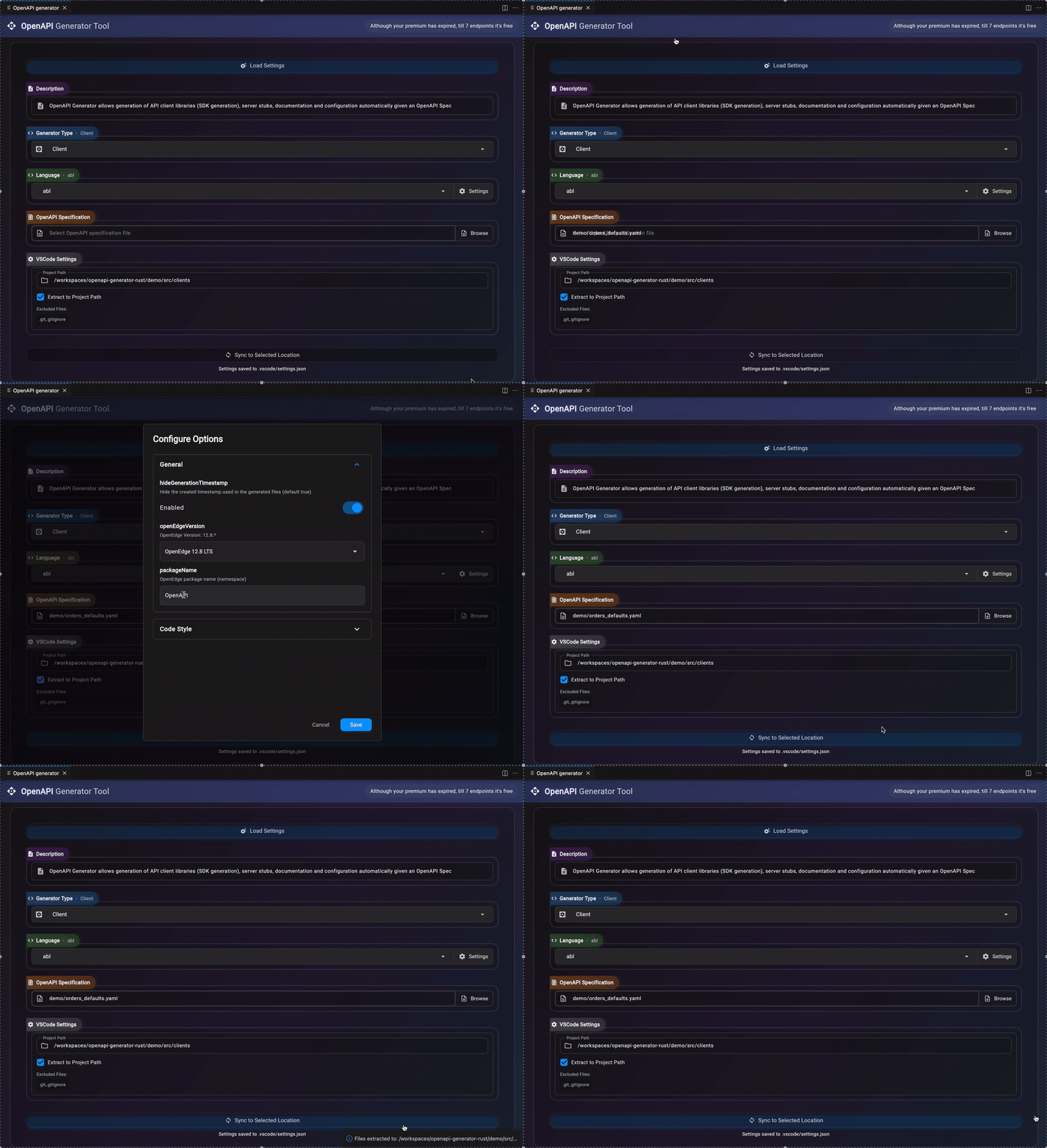
- Choose Generation Type: Select Client from the dropdown
- Choose Language: Select abl
- Configure Settings: Click the Settings button to open the configuration panel
Recommended Settings
General Settings:
- packageName: Set your desired package name (default: "OpenAPI" if not specified)
Note: These settings will be saved to .vscode/settings.json and should be committed to version control for team consistency.
Select OpenAPI Specification
- Click Browse next to "Select file"
- Choose your OpenAPI specification file (.yaml or .json)
Generate Code
- Ensure Project Path is set to your current project folder
- Click Sync to Selected Location
The generated code will be placed directly in your project folder under the specified package name.
Example Specs: Download this example spec to test the generator
Load Saved Settings
When reopening the extension later:
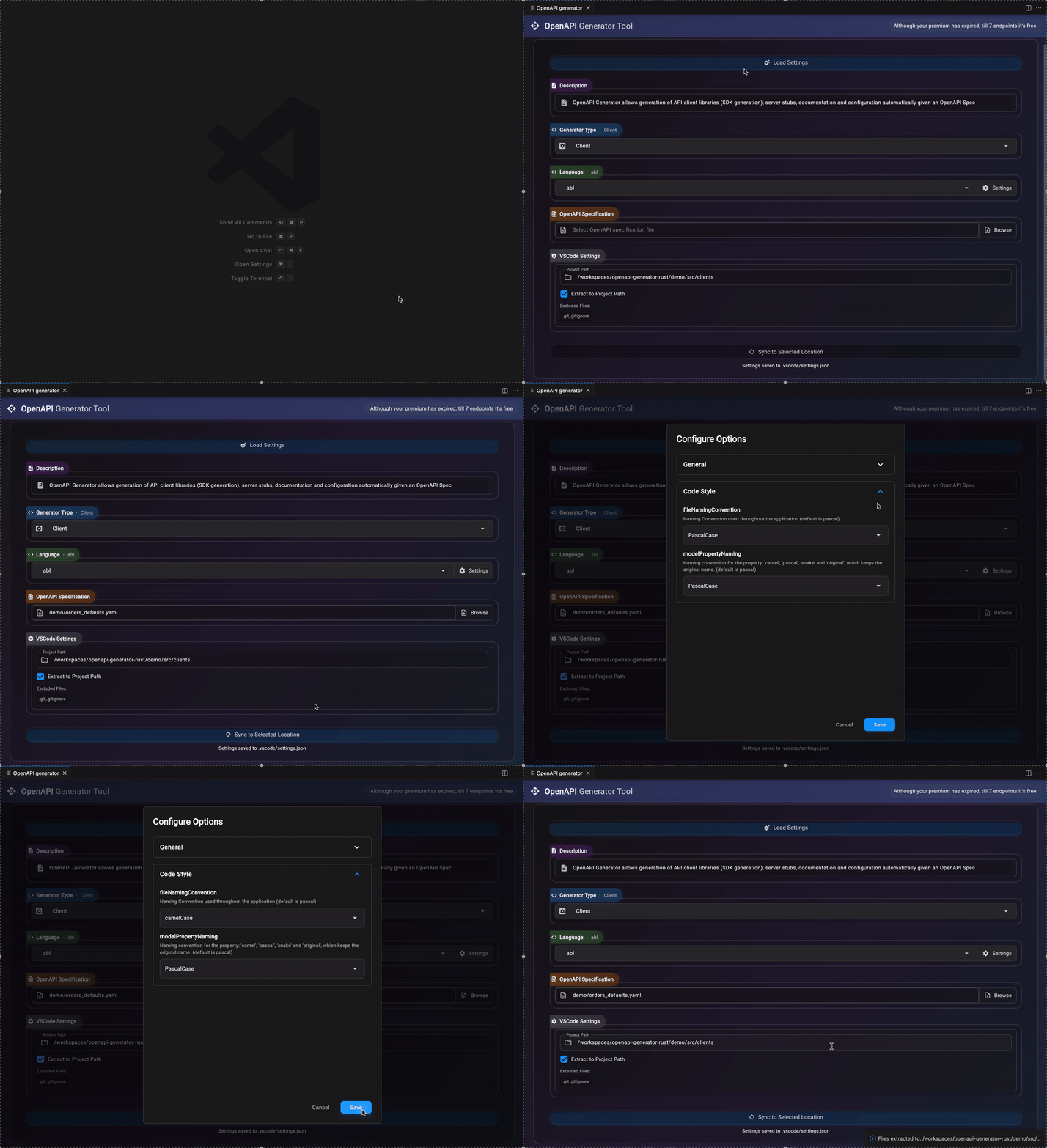
- Click Load Settings at the top
- Select from previously saved configurations
- Settings will be restored automatically
3. Project Structure
The generated ABL client library follows this structure:
[package]/
├── Apis/                  # API client classes for each endpoint group
├── Factories/             # HTTP client service factories
├── Helpers/               # Helpers used by the generated code
├── Models/                # Data model classes
│   ├── ApiRequests/       # Request models for API operations
│   │   └── Builders/      # Builder classes for request models
│   ├── ApiResults/        # Response models for API operations
│   ├── Builders/          # Builder classes for schema models
│   ├── Collections/       # Collection wrapper classes
│   └── *.cls              # Schema models from OpenAPI spec
├── Services/              # HTTP client services and utilities
└── logging.config         # Logging configuration
4. Configuration
The client library supports flexible configuration through JSON files or programmatic builders. Configuration controls validation behavior, serialization options, and HTTP client settings. See Configuration Management for detailed setup instructions.
5. Configuration Management
The client library supports flexible configuration through JSON files or programmatic builders. Configuration controls validation behavior, serialization options, and HTTP client settings.
File-Based Configuration
Use the traditional file-based approach for configuration:
// Initialize from [package]-client-config.json in PROPATH
[package].Config.ConfigManager:Initialize().
The config file supports the following options (all serialization options default to false for conservative behavior):
{
  "strictValidation": true,
  "enableModelValidation": false,
  "reloadEnabled": true,
  "fileCheckInterval": 60,
  "serialization": {
    "emitDefaults": false,
    "omitEmptyCollections": false,
    "omitNulls": false
  }
}
In-Code Configuration
For scenarios where you prefer to configure the library entirely in code without relying on config files, you can use the ConfigModelBuilder and pass the configuration directly to ConfigManager:Initialize(). This mirrors the JSON structure above, allowing programmatic configuration equivalent to the file-based approach:
using [package].Config.ConfigManager.
using [package].Config.ConfigModelBuilder.
using [package].Config.SerializationOptionsBuilder.

// Build configuration in code with nested builders
var ConfigModel oConfig = new ConfigModelBuilder()
    :SetStrictValidation(true)
    :SetReloadEnabled(false)  // Disable file monitoring
    :SetSerializationOptions(new SerializationOptionsBuilder()
        :SetEmitDefaults(false)
        :SetOmitEmptyCollections(false)
        :SetOmitNulls(false)
    )
    :Build().

// Initialize with in-code config
ConfigManager:Initialize(oConfig).
This approach:
- Eliminates the need for config files in the PROPATH
- Provides full programmatic control over configuration
- Skips file system checks for better performance
- Still allows optional file monitoring if
ReloadEnabledis set totrue
6. HTTP Client Configuration
The client uses a registry-based system for HTTP client configuration, allowing per-API and global settings without modifying generated code.
HTTP settings (auth, headers, basePath) are configured via HttpClientConfigurationBuilder instances registered in HttpClientBuilderRegistry.
Configuration Approaches
The library supports multiple configuration approaches:
1. Default Setup (No Custom Configuration)
By default, APIs use the spec's basePath and no authentication. No setup required:
using [package].Apis.OrdersApi.

// Initialize global config (optional)
[package].Config.ConfigManager:Initialize().

// Use API with default settings
var OrdersApi oApi = new OrdersApi().
2. Programmatic Configuration
For dynamic or code-based configuration:
using [package].Config.ConfigManager.
using [package].Config.ConfigModelBuilder.

// Build configuration in code
var ConfigModel oConfig = new ConfigModelBuilder()
    :Build().

[package].Config.ConfigManager:Initialize(oConfig).
HTTP Client Builder Registry
The HttpClientBuilderRegistry provides hierarchical configuration management for HTTP clients. Register builders at different levels for flexible configuration inheritance.
Per-API Configuration
Register custom HTTP settings for specific APIs:
using OpenEdge.Net.HTTP.Credentials from propath.
using [package].Services.HttpClientBuilderRegistry from propath.

// Register custom config for specific API
var HttpClientConfigurationBuilder oApiBuilder = new HttpClientConfigurationBuilder().
    :SetBasePath("https://api-specific.example.com/v2")
    :SetRequestTimeout(60)
    :SetBasicAuthCredentials(new Credentials("domain", "apiUser", "apiPass")).

HttpClientBuilderRegistry:RegisterBuilder("[package].Apis.OrdersApi", oApiBuilder).
Package-Level Configuration
Set defaults for all APIs in the package:
var HttpClientConfigurationBuilder oPackageBuilder = new HttpClientConfigurationBuilder().
    :SetRequestTimeout(30)
    :SetBasicAuthCredentials(new Credentials("domain", "defaultUser", "defaultPass")).

HttpClientBuilderRegistry:RegisterBuilder("[package]", oPackageBuilder).
Configuration Hierarchy and Resolution
Settings are resolved hierarchically from most specific to least specific:
- Exact API key (e.g.,
"[package].Apis.OrdersApi") - highest priority - Parent namespace keys (e.g.,
"[package].Apis","[package]") - Default builder (spec basePath, no auth) - lowest priority
Example Resolution Flow:
// 1. Check for exact match: "[package].Apis.OrdersApi"
// 2. Check parent: "[package].Apis"
// 3. Check package root: "[package]"
// 4. Use default builder with spec's server URL
var HttpClientConfigurationBuilder oBuilder =
    HttpClientBuilderRegistry:GetBuilder("[package].Apis.OrdersApi").
Configuration Validation
// Validate configuration before use
var HttpClientConfigurationBuilder oBuilder = HttpClientBuilderRegistry:GetBuilder("[package].Apis.OrdersApi").

if not valid-object(oBuilder)
then undo, throw new Progress.Lang.AppError("No HTTP configuration found for OrdersApi").
Configuration Reloading
// Clear and reload configuration (useful for dynamic config changes)
HttpClientBuilderRegistry:ClearBuilders().
HttpClientBuilderRegistry:ClearServiceCache().
// Re-register builders...
This registry-based approach provides maximum flexibility while maintaining clean separation between configuration and generated code.
7. Query Parameter Formatting
The client supports configurable serialization formats for array-style query parameters. This allows control over how arrays are encoded in URLs, supporting various OpenAPI styles and common conventions.
Supported Formats
The QueryParameterFormatEnum defines the following formats:
RepeatedKeys(default):?status=val1&status=val2- OpenAPI default (style=form, explode=true)CommaSeparated:?status=val1,val2- (style=form, explode=false)PipeDelimited:?status=val1|val2- (style=pipeDelimited, explode=false)SpaceDelimited:?status=val1%20val2- (style=spaceDelimited, explode=false)BracketNotation:?status[]=val1&status[]=val2- (form-style with[]suffix)IndexedKeys:?status[0]=val1&status[1]=val2- (non-standard, PHP-style)JsonString:?status=["val1","val2"]- (non-standard, JSON encoded)
Configuration
Global Default Format
Set the default format for all query parameters via config:
{
  "defaultRequestOptions": {
    "defaultQueryFormat": "CommaSeparated"
  }
}
Per-Parameter Override
Override the format for specific parameters using RequestOptions:QueryFormatMap:
using [package].Services.RequestOptions.
using [package].Helpers.QueryParameterFormatEnum.

var RequestOptions oOptions = new RequestOptions().
oOptions:AddQueryFormat("status", QueryParameterFormatEnum:CommaSeparated)
oOptions:AddQueryFormat("tags", QueryParameterFormatEnum:PipeDelimited).
Per-Request Default
Set a default format for all parameters in a request:
var RequestOptions oOptions = new RequestOptions().
oOptions:SetDefaultQueryFormat(QueryParameterFormatEnum:SpaceDelimited).
Hierarchy and Resolution
Query formats are resolved in this order (first match wins):
- Per-parameter map (
RequestOptions:QueryFormatMap) - Request default (
RequestOptions:DefaultQueryFormat) - Global Per-parameter map (
ConfigManager:DefaultRequestOptions:QueryFormatMap) - Global config (
ConfigManager:DefaultRequestOptions:DefaultQueryFormat) - OpenAPI spec (if specified in parameter definition (
styleorexplodeis set)) - Fallback (
RepeatedKeys, OpenAPI spec default)
Usage Example
using [package].Apis.PetApi.
using [package].Models.ApiRequests.FindPetsRequest.
using [package].Models.ApiRequests.Builders.FindPetsRequestBuilder.
using [package].Services.RequestOptions.
using [package].Helpers.QueryParameterFormatEnum.

var RequestOptions oOptions.
var FindPetsRequest oRequest.
var FindPetsResult oResult
var PetApi oApi.

oRequest = new FindPetsRequestBuilder()
    :AddStatusString("available")
    :AddStatusString("pending")
    :Build().

oOptions = new RequestOptions().
oOptions:AddQueryFormat("status", QueryParameterFormatEnum:CommaSeparated).

oApi = new PetApi().
oResult = oApi:FindPets(oRequest).

// Request executed with query string: ?status=available,pending
8. Builder Pattern
The generated library uses a fluent builder pattern for creating complex model objects. This pattern provides method chaining, automatic list initialization, and support for nested object creation.
Simple Models
For basic models with primitive properties:
using Orders.Models.Builders.PetBuilder.

var Pet oPet = new PetBuilder()
    :SetName("Fluffy")
    :SetId(123)
    :SetStatus("available")
    :Build().
Complex Models with Nested Objects
For models containing other model objects, you can use nested builders:
using Orders.Models.Builders.PetBuilder.
using Orders.Models.Builders.CategoryBuilder.

var Pet oPet = new PetBuilder()
    :SetName("Fluffy")
    :SetId(123)
    :SetCategory(new CategoryBuilder()
        :SetName("Dogs")
        :SetId(1)
    )
    :SetStatus("available")
    :Build().
Models with Lists
The builder pattern includes convenience methods for working with lists:
using Orders.Models.Builders.PetBuilder.
using Orders.Models.Builders.TagBuilder.

var Pet oPet = new PetBuilder()
    :SetName("Fluffy")
    :SetId(123)
    :AddTag(new TagBuilder()
        :SetName("friendly")
        :SetId(1)
    )
    :AddTag(new TagBuilder()
        :SetName("playful")
        :SetId(2)
    )
    :AddPhotoUrlsString("http://example.com/photo1.jpg")
    :AddPhotoUrlsString("http://example.com/photo2.jpg")
    :SetStatus("available")
    :Build().
Note: The AddTag() and AddPhotoUrlsString() methods automatically initialize the lists if they don't exist, making it easy to build complex objects without manual list management.
Model Builders with Default Values
This functionality will be implemented in a future version (soon).
9. API Usage Examples
Making API Requests
Here's a complete example of making an API request with a complex model:
block-level on error undo, throw.

using Orders.Apis.OrdersApi.
using Orders.Models.*.
using Orders.Models.ApiRequests.GetOrdersRequest.
using Orders.Models.ApiResults.GetOrdersResult.

var OrdersApi oOrdersApi.
// If the request contains models, you can build them here using the Model Builders
var GetOrdersRequest oRequest.
var GetOrdersResult oResult.

oOrdersApi = new OrdersApi().
oRequest = new GetOrdersRequest().
// Set all properties needed to have a valid request, each property has a public Set method.

oResult = oOrdersApi:GetOrders(oRequest).

// The result object has an IsSuccess logical, set to true when the statuscode is not larger than 299.
// You can also use the oResult:StatusCode (integer) or oResult:StatusCodeEnum to handle every case.
if oResult:IsSuccess
then do:
    /* The Result object contains the data for each possible response type described in the OpenAPI Spec.
       The property has the name of the StatusCodeEnum for the responses statuscode + Data, e.g. 200 = OkData.

       Here you can extract the correct data and perform any extra logic needed for your use case.
    */
end.
Handling Responses
The Result objects provide multiple ways to handle API responses:
var AddPetResult oResult = oPetApi:AddPet(oRequest).
var Pet oCreatedPet.
var StringMap oErrors.

// Method 1: Check IsSuccess property
if oResult:IsSuccess
then do:
    // Handle successful response
    oCreatedPet = oResult:OkData.  // For 200 responses
end.

// Method 2: Check specific status codes
if oResult:StatusCode = 200
then do:
    oCreatedPet = oResult:OkData.
end.
else if oResult:StatusCode = 400
then do:
    // Handle validation errors
    oErrors = oResult:BadRequestData.
end.

// Method 3: Use StatusCodeEnum
case oResult:StatusCodeEnum:
    when "Ok" then do:
        oCreatedPet = oResult:OkData.
    end.
    when "BadRequest" then do:
        oErrors = oResult:BadRequestData.
    end.
    otherwise do:
        message substitute("Unexpected status: &1", oResult:StatusCode).
    end.
end case.
10. Logging
To enable logging for this library, you'll need to configure the logging.config file. Logging is handled using the OpenEdge.Logging.* classes.
Default Configuration
This library includes a logging.config file with a default logger set to the DEBUG level. You can:
- Copy the provided
logging.configfile to the root of your project or anywhere in the PROPATH. - If you already have a
logging.configfile in your project, you can add the logger configuration from the provided file into your existinglogging.config, or write your own.
Example Configuration
Below is an example of the logger configuration you can include in your logging.config file:
{
    "logger": {
        "[package]": {
            "logLevel": "DEBUG",
            "filters": [
                "ERROR_FORMAT",
                "FULL_TEXT_FORMAT",
                {
                    "name": "NAMED_FILE_WRITER",
                    "fileName": "[package]_${t.today}.log",
                    "appendTo": true
                }
            ]
        }
    }
}
Multiple Project Configuration
If you have multiple projects using this library, you can configure separate logging for each:
{
    "logger": {
        "[package]": {
            "logLevel": "DEBUG",
            "filters": [
                {
                    "name": "NAMED_FILE_WRITER",
                    "fileName": "[package]_${t.today}.log",
                    "appendTo": true
                }
            ]
        },
        "[package].Apis": {
            "logLevel": "INFO",
            "filters": [
                {
                    "name": "NAMED_FILE_WRITER",
                    "fileName": "[package]-apis_${t.today}.log",
                    "appendTo": true
                }
            ]
        },
        "[package].Models": {
            "logLevel": "WARN",
            "filters": [
                {
                    "name": "NAMED_FILE_WRITER",
                    "fileName": "[package]-models_${t.today}.log",
                    "appendTo": true
                }
            ]
        }
    }
}
Advanced Logging Options
Currently, each class that uses logging will use its own namespace + class name as logger, meaning that you can enable specific logging for a single Api class, Model.
Example: If you want to log all Api classes in a separate file, add an extra logger with the namespace [package].Apis
{
    "logger": {
        ...,
        "[package].Apis": {
            "logLevel": "DEBUG",
            "filters": [
                "ERROR_FORMAT",
                "FULL_TEXT_FORMAT",
                {
                    "name": "NAMED_FILE_WRITER",
                    "fileName": "[package]-Apis_${t.today}.log",
                    "appendTo": true
                }
            ]
        }
    }
}
For more information about the logging.config and filter options, refer to the official documentation:
11. Documentation for API Endpoints
Detailed API endpoint documentation will be available when docs generation is re-enabled in a future version. For now, refer to the generated API classes in the [package].Apis package.
Available Endpoints:
-
GET /orders- Retrieve a list of orders (via OrdersApi:GetOrders()) -
POST /orders- Create a new order (via OrdersApi:PostOrders()) -
GET /orders/{orderId}- Retrieve an order by ID (via OrdersApi:GetOrdersByOrderId()) -
PUT /orders/{orderId}- Update an existing order (via OrdersApi:PutOrdersByOrderId()) -
DELETE /orders/{orderId}- Delete an order (via OrdersApi:DeleteOrdersByOrderId())
12. Documentation for Models
Detailed model documentation will be available when docs generation is re-enabled in a future version. For now, refer to the generated model classes in the [package].Models package.
13. Documentation for Authorization
Documentation for authorization will be provided in a future version.