Server Side Generator
The OpenAPI Generator for OpenEdge ABL/PASOE produces enterprise-ready server implementations with advanced features for PASOE deployment, including business logic frameworks, comprehensive validation, error handling, and configuration management.
Prerequisites
- VSCode: Install Visual Studio Code
- Riverside ABL LSP Extension: Install OpenEdge ABL (riversidesoftware.openedge-abl-lsp) for ABL language support
- Optional: API4UI Toolbox: Install API4UI - UI Designer & Toolbox (ai4you.api4ui) for simplified project setup and additional tooling similar to Developer Studio
1. Setup OpenEdge Project in VSCode
- Create a new folder for your OpenEdge project (e.g.,
openapi_server) - Open the folder in VSCode
Initialize Project Configuration
Use the API4UI Toolbox for easy project initialization (recommended):
- Right-click your project folder in VSCode Explorer
- Select API4UI Toolbox > ABL > Initialize > Initialize Project Configuration
- This creates the required
openedge-project.jsonfile for the Riverside extension
Alternatively, follow the VSCode ABL Github page for manual project configuration.
Configure Project
Configure your OpenEdge project according to your environment. The Riverside extension requires proper configuration for ABL language features to work correctly.
Note: Detailed configuration steps are beyond the scope of this guide. Refer to Riverside's documentation or use the API4UI Toolbox for guided setup.
2. Launch OpenAPI Generator Extension
- Open VSCode Command Palette (Ctrl + Shift + P / Cmd + Shift + P)
- Type and select: "Launch OpenAPI generator 😎 (vscode sync)"
Configure Generation Settings
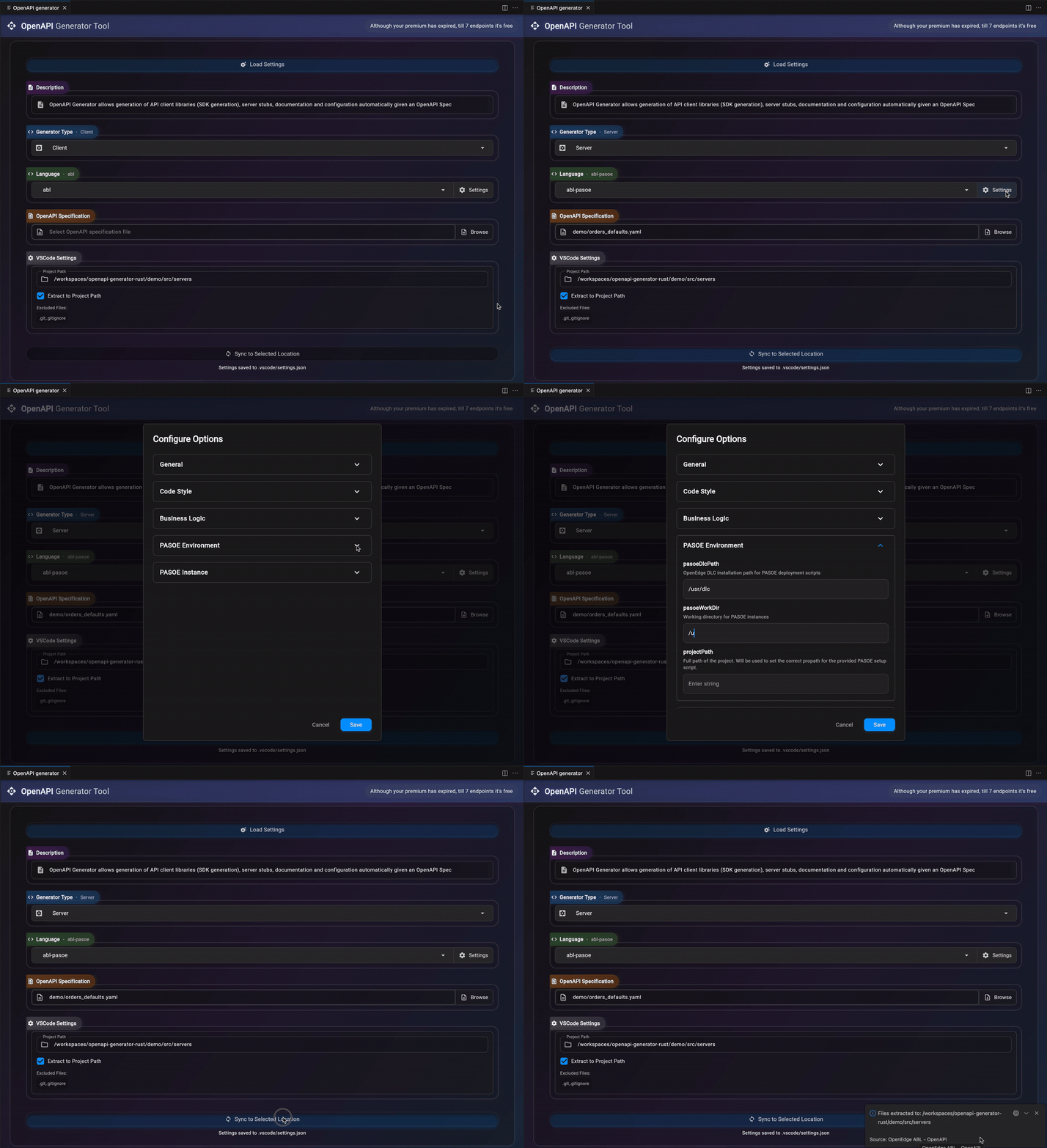
- Choose Generation Type: Select Server from the dropdown
- Choose Language: Select abl-pasoe
- Configure Settings: Click the Settings button to open the configuration panel
Recommended Settings
General Settings:
- packageName: Set your desired package name (default: "OpenAPI" if not specified)
PASOE Environment:
- pasoeDlcPath: Path to your OpenEdge DLC installation
- pasoeWorkDir: Working directory for PASOE instances
- projectPath: Path to your current project folder
PASOE Instance:
- pasoeInstanceName: Name for your PASOE instance (leave default if creating new, or specify existing)
Note: These settings will be saved to .vscode/settings.json and should be committed to version control for team consistency.
Select OpenAPI Specification
- Click Browse next to "Select file"
- Choose your OpenAPI specification file (.yaml or .json)
Generate Code
- Ensure Project Path is set to your current project folder
- Click Sync to Selected Location
The generated code will be placed directly in your project folder under the specified package name.
Example Specs: Download this example spec to test the generator
3. Post-Generation Setup
Load Saved Settings
When reopening the extension later:
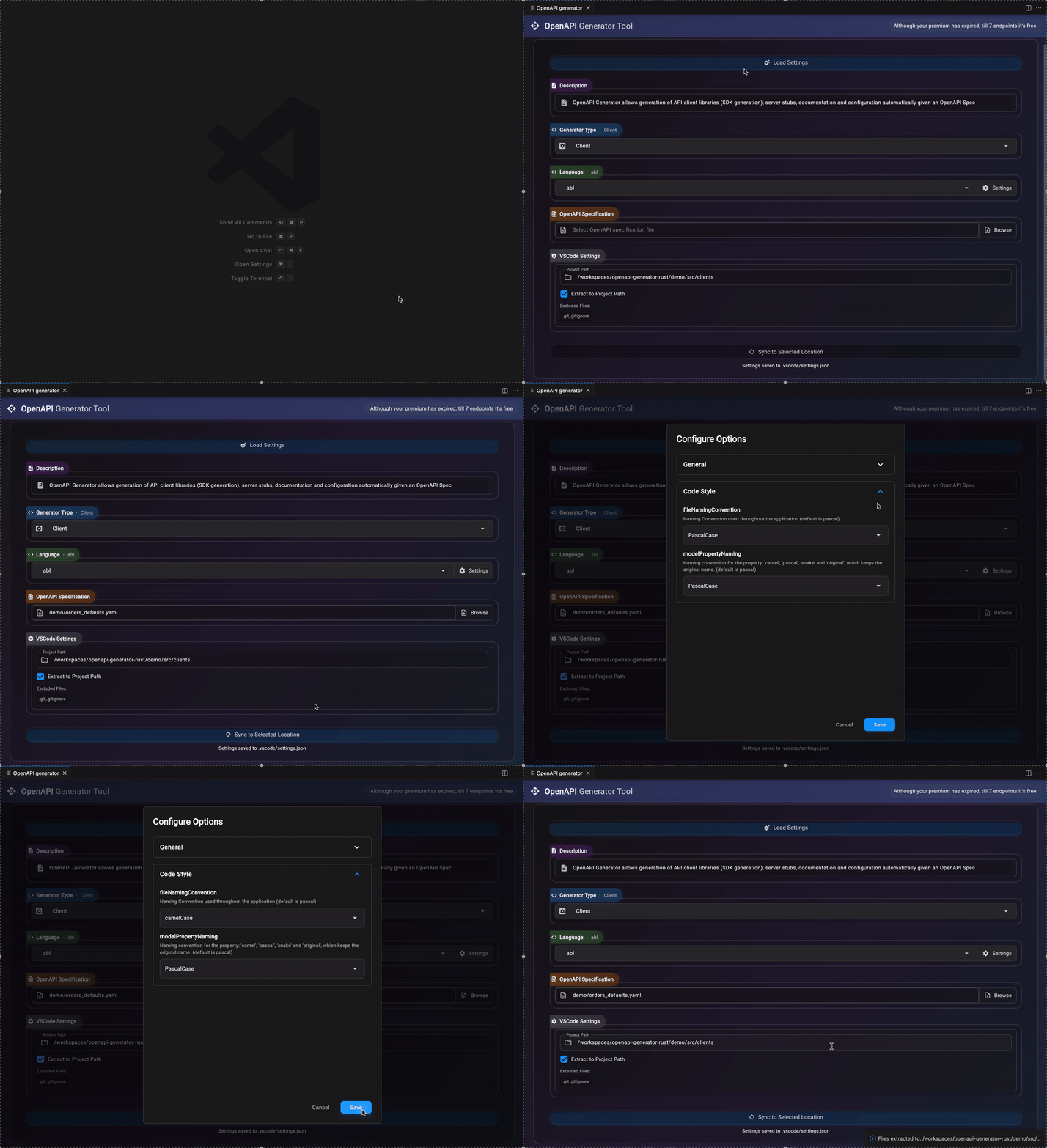
- Click Load Settings at the top
- Select from previously saved configurations
- Settings will be restored automatically
Deploy with PASOE Scripts
After generation, setup scripts are available in [package]/Resources/:
Linux:
./setup-pasoe-linux.sh
Windows:
.\setup-pasoe-windows.ps1
These scripts handle PASOE instance creation, configuration, and deployment automatically. You don't need a pre-existing PASOE instance - the scripts will create one for you.
Note: If you need to modify script variables after generation, edit them directly in the script files. They should be pre-configured based on your extension settings.
4. Project Structure
The generated PASOE server follows this structure:
[package]/
├── BusinessLogic/
│   ├── Abstract*BusinessLogic.cls    # Abstract base classes
│   └── *BusinessLogic.cls            # Concrete implementations
├── Config/                           # Config Manager
├── Factories/                        # Business logic factories
├── Helpers/                          # Helpers used by the generated code
├── Models/
│   ├── ApiRequests/                  # Request models
│       └── Builders/                 # Builder classes for request models
│   ├── ApiResults/                   # Response models
│   ├── Builders/                     # Model builders
│   ├── Collections/                  # Collection models (e.g. StringList)
│   └── Exceptions/                   # Custom exceptions
│       └── Builders/                 # Builder classes for exceptions
├── Resources/                        # PASOE deployment resources
├── ServiceAdapters/                  # PASOE service adapters
└── logging.config                    # Logging configuration
5. Configuration Management
The server supports dynamic configuration of business logic factories, variant selection, and validation settings via a JSON configuration file.
JSON Configuration File Setup
Initialization:
Call [package].Config.ConfigManager:Initialize() during session startup (see sessionStartup.p). Config example generated in Resources/[package]-api-config.json. Copy to anywhere in PROPATH for search() to find it.
Hot Reloading:
Configuration changes picked up without restart (use setup-script-* action refresh-agents for dynamic apply).
Configuration Schema
The Orders-api-config.json file follows this JSON Schema (all fields optional with fallbacks):
{
  "$schema": "http://json-schema.org/draft-07/schema#",
  "title": "[package] API Configuration",
  "description": "Configuration for ConfigManager, factories, variants, and serialization. All fields optional with fallbacks.",
  "type": "object",
  "properties": {
    "strictValidation": {
      "type": "boolean",
      "description": "Toggle strict validation in abstract BusinessLogic (e.g., stricter checks on required fields). Falls back to false.",
      "default": false
    },
    "serialization": {
      "type": "object",
      "description": "Controls JSON serialization behavior in models (ToJson() method).",
      "properties": {
        "emitDefaults": {
          "type": "boolean",
          "description": "Include default values in JSON output when not explicitly set. Defaults to false.",
          "default": false
        },
        "omitEmptyCollections": {
          "type": "boolean",
          "description": "Omit empty arrays/maps from JSON output. Defaults to false.",
          "default": false
        },
        "omitNulls": {
          "type": "boolean",
          "description": "Omit null values from JSON output. Defaults to false.",
          "default": false
        }
      },
      "default": {
        "emitDefaults": false,
        "omitEmptyCollections": false,
        "omitNulls": false
      }
    },
    "reloadEnabled": {
      "type": "boolean",
      "description": "Enable hot-reloading of config file changes without restart. Falls back to true.",
      "default": true
    },
    "fileCheckInterval": {
      "type": "integer",
      "description": "Interval in seconds to check for config file changes. Falls back to 300.",
      "default": 300
    },
    "businessLogicFactories": {
      "type": "object",
      "description": "Map of variant keys to full ABL class paths for BusinessLogic factories. Omitting uses hardcoded defaults.",
      "additionalProperties": {
        "type": "string",
        "description": "Full class path, e.g., 'Orders.Factories.BusinessLogicFactory'"
      },
      "default": {
        "default": "Orders.Factories.BusinessLogicFactory",
        "mock": "Orders.Factories.MockBusinessLogicFactory"
      }
    },
    "defaultBusinessLogicFactoryKey": {
      "type": "string",
      "description": "Default variant key from businessLogicFactories. Falls back to 'default'.",
      "default": "default"
    },
    "variantSelection": {
      "type": "object",
      "description": "Config for HTTP header-based BusinessLogic switching. Disabled if omitted.",
      "properties": {
        "enabled": {
          "type": "boolean",
          "description": "Enable variant switching via header. Falls back to false.",
          "default": false
        },
        "headerName": {
          "type": "string",
          "description": "HTTP header name for variant key (e.g., 'X-API-Variant').",
          "default": "X-API-Variant"
        }
      },
      "default": {
        "enabled": false,
        "headerName": "X-API-Variant"
      }
    }
  },
  "additionalProperties": false,
  "version": "1.0"
}
Example Configuration:
{
  "strictValidation": false,
  "defaultBusinessLogicFactoryKey": "default",
  "businessLogicFactories": {
    "default": "[package].Factories.BusinessLogicFactory",
    "mock": "[package].Factories.MockBusinessLogicFactory"
  },
  "variantSelection": {
    "enabled": false,
    "headerName": "X-API-Variant"
  },
  "serialization": {
    "emitDefaults": true,
    "omitEmptyCollections": false,
    "omitNulls": false
  },
  "reloadEnabled": true,
  "fileCheckInterval": 600
}
Factory Registration
The ConfigManager loads factory classes from the businessLogicFactories map and registers them in the FactoryRegistry.
Default Factory:
- Key: "default"
- Class:
Orders.Factories.BusinessLogicFactory- Production BusinessLogic implementation
Mock Factory:
- Key: "mock"
- Class:
Orders.Factories.MockBusinessLogicFactory- Test data (enable via generator optionmockData)
Custom Factories: Add via config for specialized implementations (implement IBusinessLogicFactory with methods returning Abstract*BusinessLogic instances). Example:
"businessLogicFactories": {
  "optimized": "Orders.Factories.OptimizedBusinessLogicFactory"
}
Registry uses dynamic-new to instantiate factories; fallback to "default" with logging if invalid.
Variant Selection
Enable with "variantSelection": {"enabled": true} in config. Use HTTP header (default: "X-API-Variant") to select BusinessLogic variant per request (fallback to default with logging if invalid):
curl -H "X-API-Variant: mock" /api/orders  # Uses mock BusinessLogic
curl /api/orders  # Uses default BusinessLogic
Serialization Options
The serialization object controls how models serialize to JSON via the ToJson() method:
emitDefaults(boolean, default: false): Include default values in JSON output when not explicitly set.omitEmptyCollections(boolean, default: false): Omit empty arrays/maps from JSON output. Whentrue, empty collections are excluded from serialization.omitNulls(boolean, default: false): Omit null values from JSON output. Whentrue, properties with null/unknown values are excluded.
Hot Reloading:
reloadEnabled(boolean, default: true): Enable hot-reloading of config file changes without restarting the application. When enabled, the system automatically detects and applies configuration changes.fileCheckInterval(integer, default: 300): Interval in seconds to check for config file changes when hot reloading is enabled. Lower values provide faster config updates but increase file system polling.
IncludeAll Logic: When emitDefaults: true AND omitEmptyCollections: false AND omitNulls: false, models use "include all" mode, serializing every property in template order.
Otherwise, models use "partial" mode, serializing only properties explicitly set via builders (in builder call order).
Property Order: Partial serialization follows builder method call order (user-controllable).
Full serialization follows OpenAPI spec property order. Explicitly set ? values serialize as null in JSON (Set{property}(?)).
Strict Validation
Set "strictValidation": true for additional validation checks in abstract BusinessLogic classes. When enabled, it performs stricter validation on required fields (e.g., checking for empty strings on required fields).
Important Notes:
- Production: Keep
strictValidation: truefor robust validation - Development/Testing: Set to
falseif you need more lenient validation during development - Invalid data types: Will always throw exceptions regardless of this setting
- Behavior: When
strictValidation: false, validation issues are logged as warnings but don't automatically throw exceptions. CheckHasErrors()in your concrete BusinessLogic classes to handle validation errors appropriately.
6. Business Logic Implementation
Inheritance Pattern
The generated server uses an inheritance pattern where you implement concrete business logic by extending abstract base classes:
using Petstore.BusinessLogic.AbstractPetBusinessLogic.

class Business.MyApp.PetBusinessLogic inherits AbstractPetBusinessLogic:

    constructor public PetBusinessLogic():
        logger = LoggerBuilder:GetLogger("Business.MyApp.PetBusinessLogic").
    end constructor.

    method public override AddPetResult AddPet(input poPayload as AddPetRequest):
        var AddPetResult oResult = new AddPetResult().

        // Your business logic here
        // Access request data via poPayload
        // Return appropriate result

        return oResult.
    end method.
end class.
Validation Hooks
The framework provides validation hooks that allow you to add custom validation logic:
class Business.MyApp.PetBusinessLogic inherits AbstractPetBusinessLogic:

    method public override ValidationErrorDetails ValidateSchemaAddPet(input poPayload as AddPetRequest):
        var ValidationErrorDetails oErrors = new ValidationErrorDetails().

        // Custom schema validation beyond OpenAPI spec
        if poPayload:Pet:PhotoUrls:Count = 0
        then oErrors:AddFieldError("pet.photoUrls", "required", "At least one photo URL required").

        return oErrors.
    end method.

    method public override ValidationErrorDetails ValidateBusinessRulesAddPet(input poPayload as AddPetRequest):
        var ValidationErrorDetails oErrors = new ValidationErrorDetails().

        // Business rule validation
        if poPayload:Pet:Name = "Fluffy"
        then oErrors:AddFieldError("pet.name", "business_rule", "Sorry, no pets named Fluffy allowed").

        return oErrors.
    end method.
end class.
Error Handling
The framework provides streamlined error handling with RFC 7807 compliant responses:
method public override AddPetResult AddPet(input poPayload as AddPetRequest):
    var AddPetResult oResult = new AddPetResult().

    // Business validation
    if poPayload:Pet:Name = ?
    then throw oResult:BadRequestException("Pet name is required").

    // Business logic
    if not CanAddPet(poPayload:Pet)
    then throw oResult:ConflictException("Pet already exists").

    // Success
    oResult:SetCreated(oCreatedPet).

    return oResult.
end method.
7. Builder Pattern
The server-side code uses the same builder pattern as the client for creating complex model objects.
Simple Models
using Petstore.Models.Pet.
using Petstore.Models.Builders.PetBuilder.

var Pet oPet = new PetBuilder()
    :SetName("Fluffy")
    :SetId(123)
    :SetStatus("available")
    :Build().
Complex Models with Nested Objects
using Petstore.Models.Pet.
using Petstore.Models.Builders.PetBuilder.
using Petstore.Models.Builders.CategoryBuilder.

var Pet oPet = new PetBuilder()
    :SetName("Fluffy")
    :SetId(123)
    :SetCategory(new CategoryBuilder()
        :SetName("Dogs")
        :SetId(1)
    )
    :SetStatus("available")
    :Build().
Models with Lists
using Petstore.Models.Pet.
using Petstore.Models.Builders.PetBuilder.
using Petstore.Models.Builders.TagBuilder.

var Pet oPet = new PetBuilder()
    :SetName("Fluffy")
    :SetId(123)
    :AddTag(new TagBuilder()
        :SetName("friendly")
        :SetId(1)
    )
    :AddTag(new TagBuilder()
        :SetName("playful")
        :SetId(2)
    )
    :AddPhotoUrlsString("http://example.com/photo1.jpg")
    :AddPhotoUrlsString("http://example.com/photo2.jpg")
    :SetStatus("available")
    :Build().
Model Builders with Default Values
Model builders include additional methods to set default values defined in your OpenAPI specification:
WithDefaults()will set all defaults defined in the specWithDefault{propertyName}()will set only the specific default for that property
using Petstore.Models.Pet.
using Petstore.Models.Builders.PetBuilder.
using Petstore.Models.Builders.TagBuilder.

var Pet oPet = new PetBuilder()
    :WithDefaults()
    :SetName("Fluffy")
    :AddTag(new TagBuilder()
        :SetName("friendly")
        :SetId(1)
    )
    :AddTag(new TagBuilder()
        :SetName("playful")
        :SetId(2)
    )
    :Build().
Notes:
- You can override specific defaults by calling setters after
WithDefaults()(calling order matters) - At this moment, only defaults for primitive data types are handled. This limitation will be addressed in a later version.
8. API Request/Response Handling
Request Processing
Request objects contain all the data from the incoming API call:
method public override AddPetResult AddPet(input poPayload as AddPetRequest):
    var AddPetResult oResult = new AddPetResult().

    // Access path parameters
    var int64 iPetId = poPayload:PetId.

    // Access query parameters
    var character cStatus = poPayload:Status.

    // Access request body
    var Pet oPet = poPayload:Body.

    // Access headers
    var character cApiKey = poPayload:ApiKey.

    return oResult.
end method.
Response Building
Result objects provide methods for different HTTP responses:
method public override GetPetByIdResult GetPetById(input poPayload as GetPetByIdRequest):
    var GetPetByIdResult oResult = new GetPetByIdResult().

    // Find the pet
    var Pet oPet = FindPetById(poPayload:PetId).

    if not valid-object(oPet)
    then throw oResult:NotFoundException(substitute("Pet with ID &1 not found", poPayload:PetId)).

    // Return successful response
    oResult:SetOk(oPet).  // Sets 200 status with pet data

    return oResult.
end method.
9. Logging Configuration
Server-Specific Logging
The server logging configuration integrates with PASOE's logging system:
{
    "logger": {
        "[package]": {
            "logLevel": "DEBUG",
            "filters": [
                "ERROR_FORMAT",
                "FULL_TEXT_FORMAT",
                {
                    "name": "NAMED_FILE_WRITER",
                    "fileName": "${env.catalina.base}/logs/[package]_${t.today}.log",
                    "appendTo": true
                }
            ]
        }
    }
}
Multiple Project Configuration
Configure separate logging for different components and projects:
{
    "logger": {
        "[package]": {
            "logLevel": "INFO",
            "filters": [
                {
                    "name": "NAMED_FILE_WRITER",
                    "fileName": "${env.catalina.base}/logs/[package]_${t.today}.log",
                    "appendTo": true
                }
            ]
        },
        "[package].BusinessLogic": {
            "logLevel": "DEBUG",
            "filters": [
                {
                    "name": "NAMED_FILE_WRITER",
                    "fileName": "${env.catalina.base}/logs/[package]-business_${t.today}.log",
                    "appendTo": true
                }
            ]
        },
        "[package].ServiceAdapters": {
            "logLevel": "WARN",
            "filters": [
                {
                    "name": "NAMED_FILE_WRITER",
                    "fileName": "${env.catalina.base}/logs/[package]-adapters_${t.today}.log",
                    "appendTo": true
                }
            ]
        }
    }
}
PASOE Log Integration
The ${env.CATALINA_BASE} variable ensures logs are written to PASOE's standard log directory alongside other server logs.
10. Error Handling & Validation
RFC 7807 Compliance
All errors follow RFC 7807 (Problem Details) format:
{
  "type": "https://api.example.com/errors/bad-request",
  "title": "Bad Request",
  "status": 400,
  "detail": "The request contains invalid data",
  "instance": "/operations/addPet"
}
Custom Error Models
Define custom error models in your OpenAPI spec for structured error responses:
// OpenAPI spec defines CustomError model
// Generated classes handle serialization automatically

method public override AddPetResult AddPet(input poPayload as AddPetRequest):
    var AddPetResult oResult = new AddPetResult().

    if poPayload:Pet:Age < 0
    then do:
        undo, throw new CustomErrorException(new CustomErrorBuilder()
            :SetErrorCode("INVALID_AGE")
            :SetMessage("Pet age cannot be negative")
            :SetDetails(/* additional data */)
            :Build()
        ).
    end.

    return oResult.
end method.
Validation Patterns
Use the ValidationContext pattern for optimized validation:
method public override ValidationContext ValidateAddPetContext(input poPayload as AddPetRequest):
    var ValidationContext oContext = new ValidationContext("AddPet").
    var ValidationErrorDetails oSchemaErrors, oBusinessErrors.

    // Schema validation
    oSchemaErrors = this-object:ValidateSchemaAddPet(poPayload).

    if valid-object(oSchemaErrors) and oSchemaErrors:HasErrors()
    then do:
        oContext:MergeErrors(oSchemaErrors).
        oContext:SetSchemaValidationFailed().
    end.

    // Business rules validation (only if schema passed)
    if oContext:IsValid()
    then do:
        oBusinessErrors = this-object:ValidateBusinessRulesAddPet(poPayload).
        if valid-object(oBusinessErrors) and oBusinessErrors:HasErrors()
        then do:
            oContext:MergeErrors(oBusinessErrors).
            oContext:SetBusinessRuleValidationFailed().
        end.
    end.

    return oContext.
end method.
Note: For comprehensive validation guidance, see Error Handling & Validation Guide
11. PASOE Deployment
The generated code includes comprehensive deployment automation with support for both legacy and modern PASOE configurations. The deployment scripts provide intelligent port conflict avoidance, automatic handler ordering, and seamless format conversion between legacy and JSON configurations. For detailed deployment instructions, see PASOE Deployment Guide.
Setup Scripts
The generated code includes automated setup scripts:
- setup-pasoe-linux.sh - Linux deployment script
- setup-pasoe-windows.ps1 - Windows deployment script
- update-handlers.sh - Handler configuration script
Handler Configuration
The system supports both legacy and modern handler configuration formats:
JSON Format (Modern - OpenEdge 12.2+ with migration)
The ROOT.handlers file maps URIs to PASOE handler classes:
{
  "version": "2.0",
  "serviceName": "ROOT",
  "handlers": [
    {
      "uri": "/pet/{petId}",
      "class": "Petstore.ServiceAdapters.PetServiceAdapter",
      "enabled": true
    }
  ]
}
Legacy Format (oeprop.properties)
For legacy systems, you can provide handlers in oeprop.properties format. The system supports two variations:
Full Path Format:
+{AblApp}.{WebApp}.WEB.handler1=Petstore.ServiceAdapters.PetServiceAdapter: /pet/{petId}
+{AblApp}.{WebApp}.WEB.handler2=Petstore.ServiceAdapters.StoreServiceAdapter: /store/order
Simple Format (handler number only):
handler1=Petstore.ServiceAdapters.PetServiceAdapter: /pet/{petId}
handler2=Petstore.ServiceAdapters.StoreServiceAdapter: /store/order
Automatic Format Conversion: The deployment scripts automatically detect and convert between formats. You can provide either format - the system will handle the conversion appropriately for your PASOE version.
Deployment Automation
Use the provided scripts for automated deployment:
# Linux - Full setup
./setup-pasoe-linux.sh

# Linux - Specific action (e.g., refresh agents)
./setup-pasoe-linux.sh refresh-agents

# Windows PowerShell - Full setup
.\setup-pasoe-windows.ps1

# Windows PowerShell - Specific action (e.g., refresh agents)
.\setup-pasoe-windows.ps1 -Action refresh-agents
Setting Default Actions: For development convenience, you can set default actions by editing the script variables. For example, to make the script refresh agents by default during development:
Linux (setup-pasoe-linux.sh):
# Near the top of the script, change:
ACTION="full"
# To:
ACTION="refresh-agents"
Windows (setup-pasoe-windows.ps1):
# Near the top of the script, change:
[string]$Action = "full"
# To:
[string]$Action = "refresh-agents"
Then simply run ./setup-pasoe-linux.sh or .\setup-pasoe-windows.ps1 without arguments to perform your default action.
These scripts handle:
- PROPATH configuration
- Handler registration and format conversion
- Service startup
- Basic validation
For detailed usage instructions and advanced options, see PASOE Deployment Guide.
12. Working Demo in Postman
Instantly you have a working demo in Postman.
- Drag & drop your OpenAPI spec in Postman
- Change in the collection the variable baseUrl to
http://localhost:28000/{webAppName}/web - Run request